Juniper SRX: Virtual Private Networks - VPNs
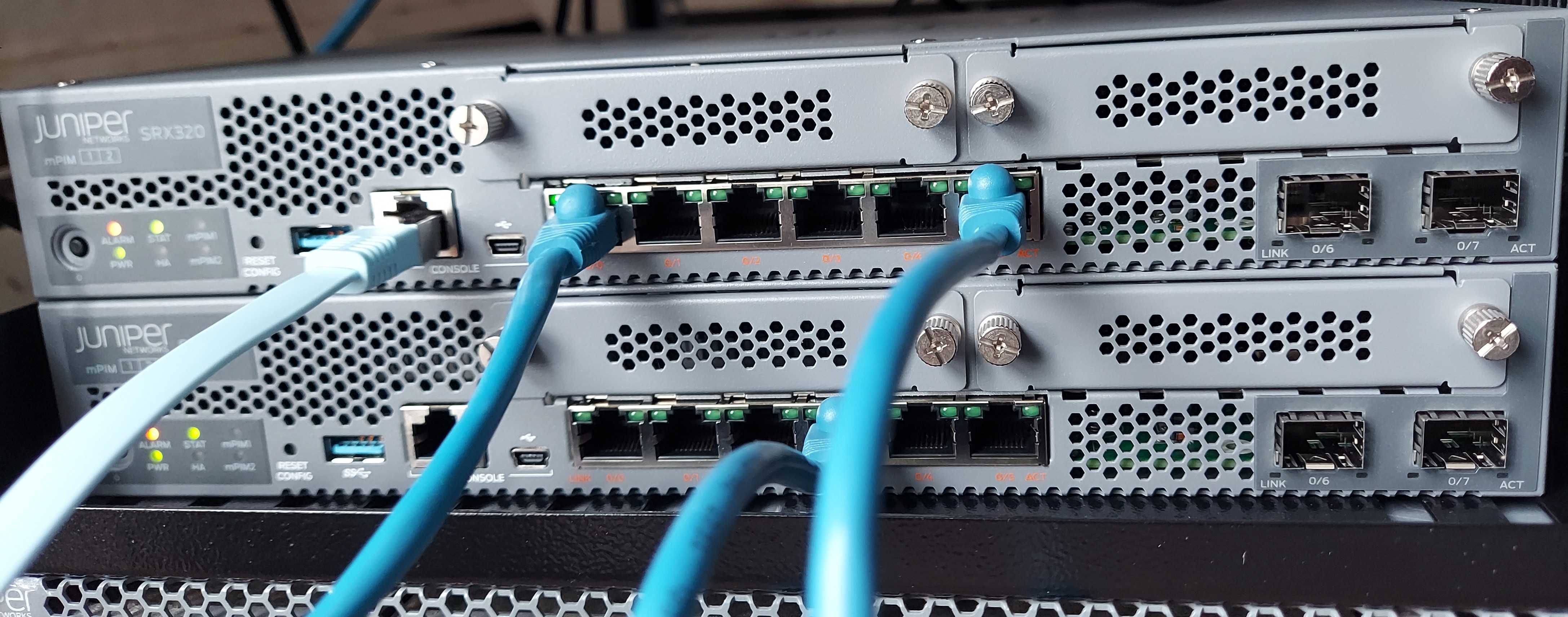
VPNs are a secure mechanism to establish a connection between two sites. In this post we are going to focus on IPsec. IPsec is a set of standards and protocols used to used to authenticate and encrypt packets.
IPsec
IPsec provides four functions:
- Authentication
- Integrity
- Confidentiality
- Replay protection
IPsec encryption algorithms
-
Data Encryption Standard -
DES -
Triple Data Encryption Standard -
3DES -
Advanced Encryption Standard -
AES
IPsec authentication algorithms
-
MD5
-
SHA-1
-
SHA-2
IPsec VPN key exchange
-
Manual key exchange
-
Internet Key Exchange
IPsec VPN Modes
-
Tunnel Mode
-
Transport Mode
Junos device always operate in tunnel mode for IPsec tunnel.
The transport mode has a lower overhead compared to tunnel mode but it can cause IP addressing information to be exposed.
IPsec configuration
SRX supports two types of VPN configuration:
-
Policy-based VPN: here only the traffic the matches the configured policy will be encrypted. This is commonly used for simple site to site VPNs and remote access VPNs.
-
Route-based VPN: all traffic routed into the virtual tunnel interface will be sent over the VPN tunnel. The virtual interface is know as
secure tunnel interface - (st0)
Policy-based VPN Configuration
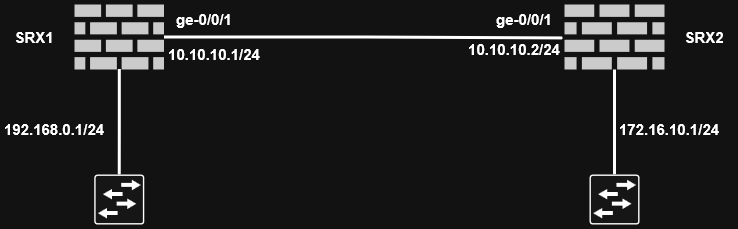
The configuration needs to be done on both perimeter devices. We should configure the zone where IPsec traffic terminates to accept IKE traffic with
edit security zones security-zone ZONE-A

set host-inbound-traffic system-services ike
-
Configure IKE proposal
-
Authentication method
-
Authentication algorithm
-
Encryption algorithm
-
Diffie-Hellman group
-
Lifetime
-
edit security ike

set proposal IKE-PROPOSAL-1 authentication-method pre-shared-keys

set proposal IKE-PROPOSAL-1 authentication-algorithm sha1

set proposal IKE-PROPOSAL-1 encryption-algorithm aes-128-cbc

set proposal IKE-PROPOSAL-1 dh-group group2

set proposal IKE-PROPOSAL-1 lifetime-seconds 86400
Make sure the device at the other end is also configured the same.
-
Configure IKE policy
- Mode (main or aggressive)
- Pre-shared key
- IKE proposal to use
edit security ike

set policy IKE-POLICY-1 mode main

set policy IKE-POLICY-1 proposals IKE-PROPOSAL-1

set policy IKE-POLICY-1 pre-shared-key ascii-text "sECrET KeY 1"
The pre-shared-key must match on both endpoints.
-
Configure IKE gateway
- IKE policy to use
- Remote gateway address
- External interface
edit security ike

set gateway SRX-2 ike-policy IKE-POLICY-1

set gateway SRX-2 address 10.10.10.2

set gateway SRX-2 external-interface ge-0/0/1.0
This marks the end of phase 1 configuration.
-
Configure IPsec proposal
- Security protocol (ESP or AH)
- Authentication algorithm
- Encryption algorithm (only if ESP is used)
edit security ipsec

set proposal IPSEC-PROPOSAL-1 protocol esp

set proposal IPSEC-PROPOSAL-1 encryption-algorithm aes-128-cbc

set proposal IPSEC-PROPOSAL-1 authentication-algorithm hmac-sha1-96
This marks the end of phase 2 configuration.
-
Configure IPsec policy
- Perfect forward secrecy (Diffie-Hellman group)
- IPsec proposal to use
edit security ipsec

set policy IPSEC-POLICY-1 perfect-forward-secrecy keys group2

set policy IPSEC-POLICY-1 proposals IPSEC-PROPOSAL-1
-
Configure IPsec VPN
- Gateway
- IPsec policy to use
edit security ipsec

set vpn SRX1-SRX2 ike gateway SRX-2

set vpn SRX1-SRX2 ike ipsec-policy IPSEC-POLICY-1

set vpn SRX1-SRX2 establish-tunnels immediately
This marks the end of phase 1 and phase 2 configuration.
-
Configure security policies
- One policy per direction of flow
edit security policies

set from-zone ZONE-A to-zone ZONE-B policy ZONEA-ZONEB-VPN

set match source-address any

set match destination-address any

set match application any

set then permit tunnel ipsec-vpn SRX1-SRX2
For the other direction of the traffic:
edit security policies

set from-zone ZONE-A to-zone ZONE-B policy ZONEB-ZONEA-VPN

set match source-address any

set match destination-address any

set match application any

set then permit tunnel ipsec-vpn SRX1-SRX2
We then use pair-policy to link policies that reference the same VPN tunnel. In our case ZONEA-ZONEB-VPN and ZONEB-ZONEA-VPN.
set then permit tunnel pair-policy ZONEA-ZONEB-VPN
In the previous policy we also add:
set then permit tunnel pair-policy ZONEB-ZONEA-VPN
Then finally set the maximum segment size (MSS) value for the VPN:
set security flow tcp-mss ipsec-vpn mss 1350
Then verify and commit the configuration.
Repeat the configuration for the other device.
Route-based VPN Configuration
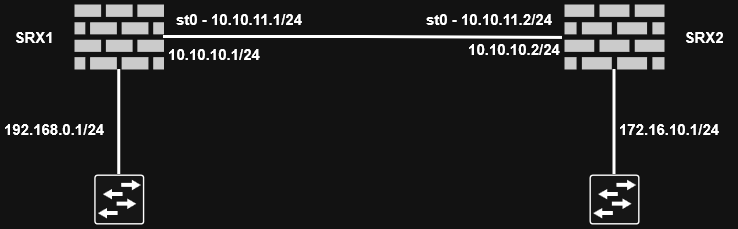
The VPN type determines what traffic will be encrypted. Regardless of the type of configuration, IPsec functionality remains the same.
- Configure secure tunnel interface
edit interfaces st0

set unit 0 family inet address 10.10.11.1/24
- Configure security zone
Define a zone for secure tunnel interface.
edit security zones security-zone VPN-ZONE-1

set interfaces st0.0
- Configure route
Route VPN traffic via st0
set routing-options static route 172.16.10.1/24 next-hop st0.0
-
Configure IKE proposal
- Authentication method
- Authentication algorithm
- Encryption algorithm
- Diffie-Hellman group
- Lifetime
edit security ike

set proposal IKE-PROPOSAL-1 authentication-method pre-shared-keys

set proposal IKE-PROPOSAL-1 authentication-algorithm sha1

set proposal IKE-PROPOSAL-1 encryption-algorithm aes-128-cbc

set proposal IKE-PROPOSAL-1 dh-group group2

set proposal IKE-PROPOSAL-1 lifetime-seconds 86400
-
Configure IKE policy
- Mode (main or aggressive)
- Pre-shared key
- IKE proposal to use
edit security ike

set policy IKE-POLICY-1 mode main

set policy IKE-POLICY-1 proposals IKE-PROPOSAL-1

set policy IKE-POLICY-1 pre-shared-key ascii-text "sECrET KeY 1"
-
Configure IKE gateway
- IKE policy to use
- Remote gateway address
- External interface
edit security ike

set gateway SRX-2 ike-policy IKE-POLICY-1

set gateway SRX-2 address 10.10.10.2

set gateway SRX-2 external-interface ge-0/0/1.0

set gateway SRX-2 version v2-only
This marks the end of phase 1 configuration
-
Configure IPsec proposal
- Security protocol (ESP or AH)
- Authentication algorithm
- Encryption algorithm (only if ESP is used)
edit security ipsec

set proposal IPSEC-PROPOSAL-1 protocol esp

set proposal IPSEC-PROPOSAL-1 encryption-algorithm aes-128-cbc

set proposal IPSEC-PROPOSAL-1 authentication-algorithm hmac-sha1-96
-
Configure IPsec policy
- Perfect forward screcy (DH group)
- IPsec proposal to be used
edit security ipsec

set policy IPSEC-POLICY-1 perfect-forward-secrecy keys group2

set policy IPSEC-POLICY-1 proposals IPSEC-PROPOSAL-1
-
Configure IPsec VPN
- Gateway
- IPsec policy to use
- Bind with
st0interface
edit security ipsec

set vpn SRX1-SRX2 ike gateway SRX-2

set vpn SRX1-SRX2 ike ipsec-policy IPSEC-POLICY-1

set vpn SRX1-SRX2 establish-tunnels immediately

set vpn SRX1-SRX2 bind-interface st0.0
-
Configure security policies
- One policy per direction of flow
edit security policies

set from-zone ZONE-A to-zone VPN-ZONE-1 policy ZONEA-VPNZONE1

set match source-address any

set match destination-address any

set match application any

set then permit
For the return traffic:
edit security policies

set from-zone VPN-ZONE-1 to-zone ZONE-A policy VPNZONE1-ZONEA-VPN

set match source-address any

set match destination-address any

set match application any

set then permit
Set the maximum segment size (MSS) value for the VPN:
set security flow tcp-mss ipsec-vpn mss 1350
Verify and commit the configuration.
Repeat the configuration for the other device.